RTO Vehicle Information & Check Vehicle Owner Details By Number Plate
RTO Vehicle Information helps you check important details of any registered vehicle in India using its number plate. With the help of official databases like Parivahan and RTO records, you can view vehicle owner details, RC registration status, insurance validity, fuel type, vehicle model, fitness, permit (for commercial vehicles), and more.
Enter Vehicle Number
Select Location
This guide explains how to check RTO vehicle information online, the best official method using Parivahan, and how you can safely use an RTO vehicle information app like mParivahan to verify a vehicle before buying, selling, or reporting any issue.
What is RTO Vehicle Information?
RTO Vehicle Information refers to the official registration and vehicle record details stored in India's Regional Transport Office (RTO) database. These details are linked with the vehicle's registration number (number plate) and are used for verification, legal compliance, and transport-related services.
When you check RTO vehicle information online, you are basically accessing available vehicle records through government-supported platforms like Parivahan Sewa or approved RTO-connected systems.
What Does RTO Vehicle Information Include?
RTO records typically contain details related to:
- Vehicle registration (RC) status
- Vehicle make, model, and class
- Fuel type and manufacturing year
- Owner-related details (limited visibility online)
- Insurance and fitness validity (where available)
- Permit and tax information for commercial vehicles
- Hypothecation / loan status
Why This Vehicle Information Matters?
People use RTO vehicle information online for many reasons, such as:
- Verifying a used vehicle before purchase
- Checking if RC is valid or expired
- Confirming insurance status
- Identifying the correct RTO and state code
- Checking if a vehicle has loan (hypothecation)
- Preventing fraud during resale or ownership transfer
What details do you get in the RTO Vehicle Information Report?
When you check RTO vehicle information by number plate, the system generates a vehicle detail report based on available RTO/Parivahan records. This report helps you verify whether a vehicle is legally registered, active, insured, and eligible for road use. Below are the main categories of information you can typically see.
1) Basic Vehicle Details
This section confirms the identity of the vehicle.
- Vehicle make (Brand)
- Vehicle model / variant (if available)
- Vehicle class (2W/4W/Commercial)
- Vehicle type (Private / Transport)
- Fuel type (Petrol/Diesel/CNG/Electric)
- Manufacturing year (in many cases)
- Body type (in some cases)
2) Registration (RC) Details
These are the most important legal details stored in the RTO database.
- Vehicle registration number
- Registration date
- Registration validity (RC expiry)
- Registration status (Active / Expired)
- RTO office name
- RTO code (example: MH12, UP32, MP09 etc.)
3) Vehicle Owner Details (As Available)
This is the most searched part of the report.
- Owner name (may be partially masked online)
- Owner type (Individual / Company)
- Ownership number (1st owner, 2nd owner, etc.)
Note: Many users search "vehicle owner details by number plate online", but full owner identity may not always be displayed due to privacy rules.
4) Insurance Details (If Available)
- Insurance provider name
- Insurance policy status
- Insurance expiry date (in many cases)
5) Fitness Details (Mainly for Commercial Vehicles)
- Fitness certificate status
- Fitness validity date
6) Permit Details (Commercial Vehicles Only)
- Permit type (National/State/Local)
- Permit status
- Permit validity date
7) Road Tax Details (If Available)
- Road tax paid status
- Tax validity (where shown)
8) PUC Details (If Available)
- PUC certificate status
- PUC expiry date
9) Hypothecation / Loan Details
- Hypothecation status (Yes/No)
- Financier/bank name (if loan exists)
- HP removal status (if closed)
10) Challan / Pending Dues (Sometimes Available)
- Pending eChallan details
- Traffic fines (linked systems)
How to Check RTO Vehicle Information Online?
If you want to check RTO vehicle information online, the safest and most reliable methods are the ones connected to official RTO/Parivahan records. Below are the 3 best ways to check vehicle details using a number plate.
Method 1: Check on Vehicle Information On Parivahan
Parivahan is the official transport service platform of the Government of India. It is the most trusted method to check RTO vehicle information by number.
Steps to Check RTO Vehicle Information Online on Parivahan:
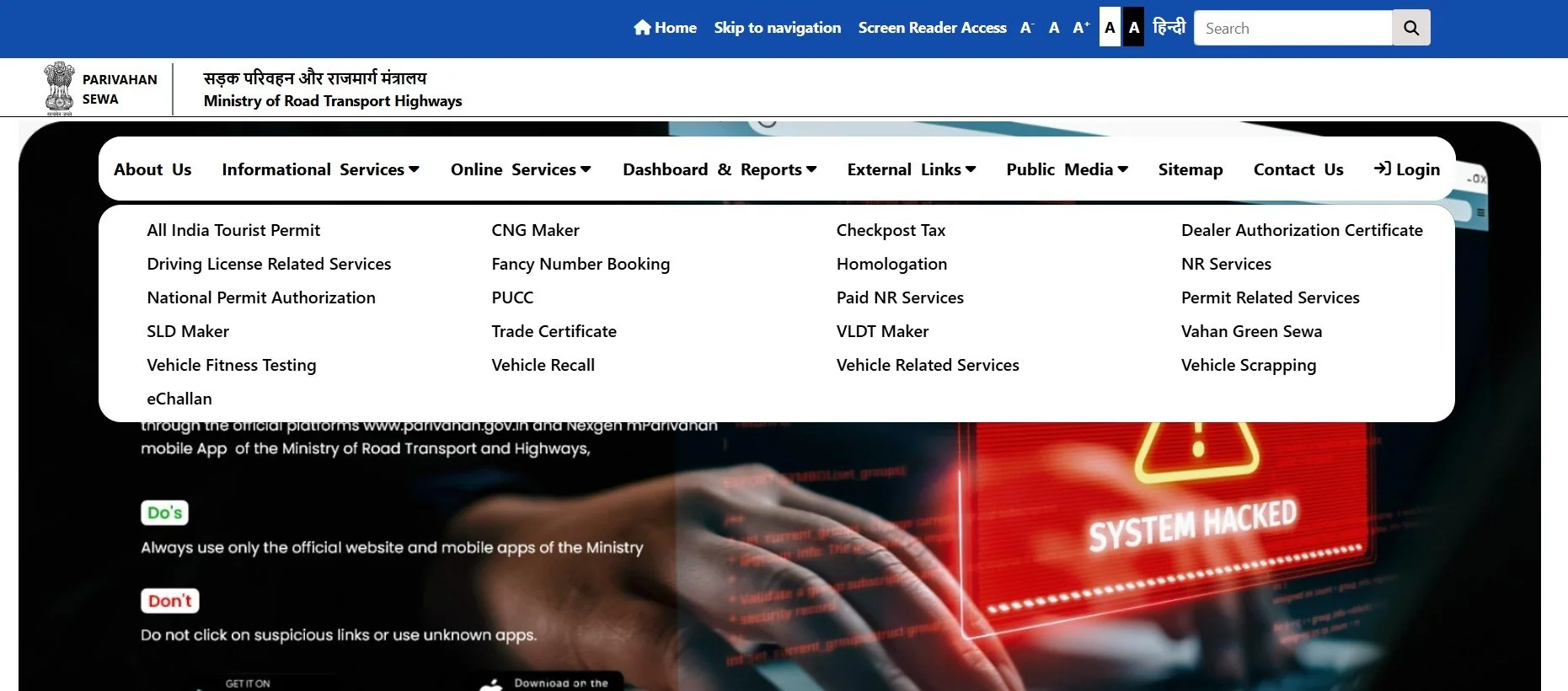
- Open the official Parivahan portal
- Go to the option like "Know Your Vehicle Details"
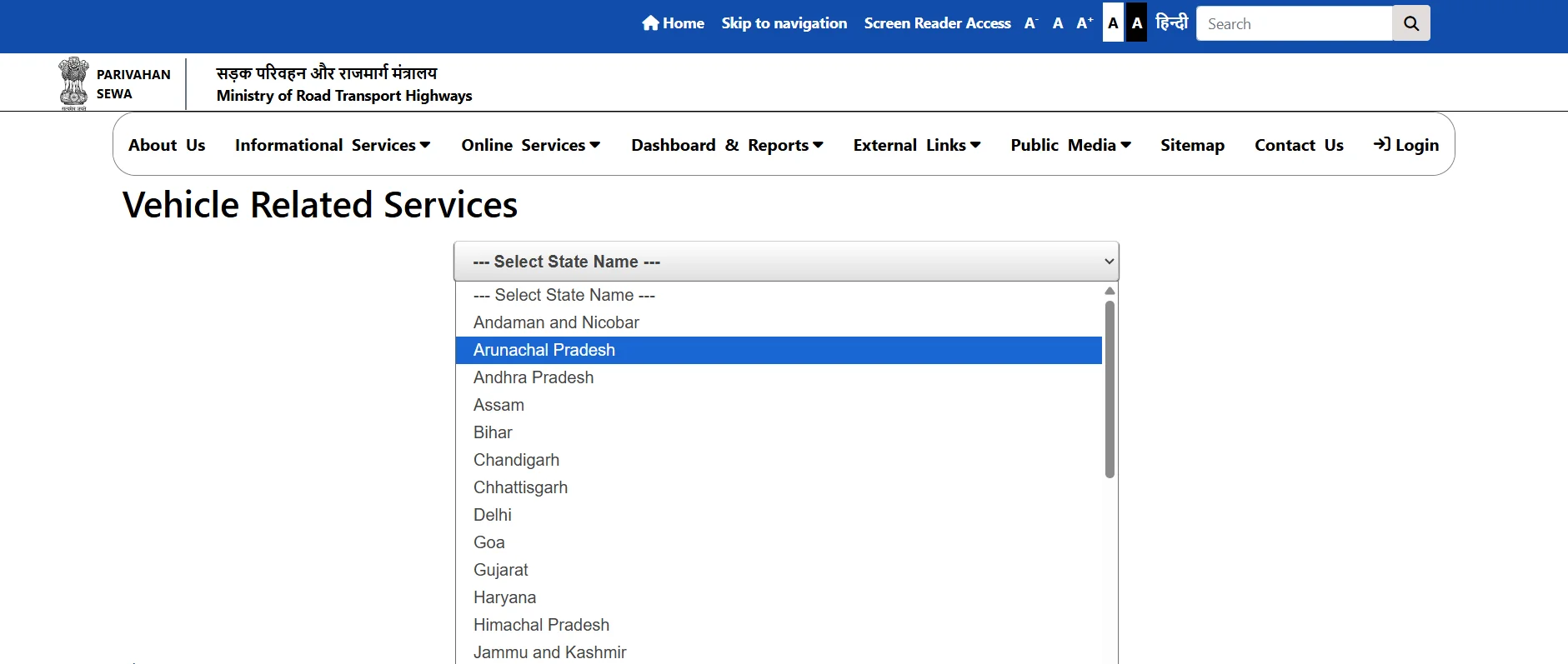
- Select State
- Enter your vehicle registration number
- Enter the captcha / OTP (if required)
- View the available vehicle information report
Best for:
- RC details
- Vehicle registration status
- RTO information
- Owner details (limited visibility)
Method 2: Use RTO Vehicle Information App (mParivahan)
If you want a mobile-friendly option, the best RTO vehicle information app is the official mParivahan app.
Steps to Check Vehicle Details Using mParivahan App:
- Install mParivahan from Play Store / App Store
- Create an account (mobile OTP verification)
- Tap "Add Vehicle"
- Enter the vehicle number plate
- View RC-related details in your dashboard
Method 3: Visit RTO Office (Offline Method)
If you need full and verified vehicle owner details, the RTO office method is the most official and complete.
When to Visit RTO:
- Accident/legal cases
- Ownership disputes
- Fraud complaints
- Police verification
- Stolen vehicle cases
RTO may require valid reason and supporting documents to provide full owner identity details.
Which Method is Best?
- Parivahan → Best for official online lookup
- mParivahan → Best for quick mobile access
- E Challan Parivahan → Best for e challan check
RTO Vehicle Information App – Best Way to Check Vehicle Details on Mobile
Many people prefer checking RTO vehicle information online using a mobile app because it is faster, easier, and works anytime. If you want to check vehicle details using a number plate, the most trusted option is the official mParivahan app.
This section explains what an RTO vehicle information app can show, how it works, and what limitations you should know before relying on it for owner verification.
Which is the Best RTO Vehicle Information App?
The most reliable and government-supported app is:
mParivahan (Official App) — Managed under the Parivahan / MoRTH ecosystem. Shows RC-related information linked to the vehicle number. Supports adding multiple vehicles.
What You Can Check in an RTO Vehicle Information App
- Registration number and RC status
- Vehicle make, model, and class
- Fuel type
- Registration date and validity
- RTO name and state code
- Insurance status (in many cases)
- Hypothecation / loan details (if available)
- Ownership count (sometimes)
What You Cannot Reliably Get from Apps
A lot of users search for: vehicle owner details by number plate online, owner details by vehicle number, find vehicle owner details. But it's important to understand that most apps cannot legally show complete owner identity like:
- Full owner name (may be masked)
- Mobile number
- Address
- Aadhaar/PAN linked details
This is done for privacy and security reasons.
RTO Vehicle Information State-Wise (UP, MP, MH, AP, CG, etc.)
Users often search state-specific RTO vehicle information like rto vehicle information UP, mp rto vehicle information, or rto vehicle information MH. The process is mostly the same across India because most RTOs are connected with the Parivahan system.
| State | Common Search Terms | Common Vehicle Series | Best Online Method |
|---|---|---|---|
| Uttar Pradesh | rto vehicle information up | UP16, UP32, UP53, UP70 | Parivahan / mParivahan |
| Madhya Pradesh | mp rto vehicle information | MP04, MP09, MP20 | Parivahan / mParivahan |
| MP (Bhopal) | rto bhopal vehicle information | MP04 | Parivahan / mParivahan |
| Maharashtra | rto vehicle information mh | MH01, MH12, MH14 | Parivahan / mParivahan |
| Andhra Pradesh | rto vehicle information ap | AP16, AP28, AP39 | Parivahan / mParivahan |
| Chhattisgarh | rto vehicle information cg | CG04, CG07, CG10 | Parivahan / mParivahan |
| Rajasthan | rto vehicle information rajasthan | RJ14, RJ27, RJ45 | Parivahan / mParivahan |
| Himachal Pradesh | rto vehicle information hp | HP12, HP22, HP34 | Parivahan / mParivahan |
| Bihar | rto vehicle information bihar | BR01, BR06, BR11 | Parivahan / mParivahan |
| Assam | rto vehicle information assam | AS01, AS11, AS23 | Parivahan / mParivahan |
| Haryana | rto vehicle information hr | HR26, HR51, HR98 | Parivahan / mParivahan |
| Odisha | rto vehicle information odisha | OD02, OD05, OD33 | Parivahan / mParivahan |
| Punjab | rto vehicle information punjab | PB10, PB23, PB65 | Parivahan / mParivahan |
| Karnataka | rto vehicle information app karnataka | KA01, KA03, KA05 | mParivahan / Parivahan |
Vehicle Owner Details (RTO Vehicle Owner Details)
A large number of users search for vehicle owner details to verify who a vehicle is registered to, especially when buying a second-hand bike/car, checking accident involvement, or confirming ownership before transferring the RC.
Using RTO vehicle information, you can view owner-related details linked to the registration number. However, the visibility of owner data depends on the platform and privacy rules.
Vehicle Owner Details in RTO Vehicle Information (By Number Plate)
When you check RTO vehicle information online, one of the most searched parts is vehicle owner details. People usually want to confirm who the vehicle is registered to, especially while purchasing a second-hand vehicle or verifying registration status. Using the vehicle number plate, you can access available RTO vehicle owner details through official systems like Parivahan and the mParivahan app.
Vehicle Owner Details by Number Plate Online
If you want vehicle owner details by number plate online, always prefer trusted sources such as Parivahan vehicle owner details search and mParivahan (official app). These platforms are linked to RTO databases, so the information is more reliable than random third-party apps.
Vehicle Registration Owner Details (RC-Based)
Vehicle registration owner details are the official ownership details stored in the RC (Registration Certificate). Even if you check details online, the RC is the final legal proof of ownership. For used vehicle verification, always match: RC copy, chassis number, engine number.
How to Check Vehicle Owner Details?
If you're searching how to check vehicle owner details, follow this simple method:
- Enter the vehicle number plate
- Check details on Parivahan or mParivahan
- Verify RC status + ownership info
- Cross-check with the physical RC for confirmation
How to Get Vehicle Owner Details? (Full Verified Method)
If you want complete verified details (for legal reasons), the correct way is: Visit the RTO office with valid reason, OR File a request through police (in accident/stolen cases). This is the safest method for queries like how to get vehicle owner details.
Steps to Check Vehicle Owner Details (By Number Plate)
- Note the vehicle number plate correctly (example: MH12AB1234)
- Open Parivahan "Know Your Vehicle Details" or the mParivahan app
- Enter the vehicle registration number in the search field
- Complete captcha / OTP verification (if asked)
- View the owner-related details (owner name may be masked)
- Check ownership count + RC registration status
- Cross-check the result with the physical RC before purchase/transfer
Common Issues While Checking RTO Vehicle Information (Fix Guide)
Even though Parivahan and RTO-connected systems are reliable, sometimes users face errors while checking RTO vehicle information online or vehicle owner details by number plate. Most of these issues are common and can be fixed easily.
1) Vehicle Number Not Found
Why it happens:
- Wrong number format entered
- Vehicle record not digitized (old vehicles)
- Recently registered vehicle not updated yet
What to do:
- Recheck spelling (O vs 0, I vs 1)
- Try again without spaces
- Wait 24–48 hours if the vehicle is newly registered
2) Invalid Vehicle Number Format
Why it happens:
- Extra spaces or special characters
- Missing state code or digits
What to do:
- Enter in correct format like: MH12AB1234
- Avoid hyphens and symbols
3) OTP Not Received (Parivahan / App)
Why it happens:
- Network issue
- OTP delay due to server load
- DND enabled on mobile
What to do:
- Try again after 2–5 minutes
- Switch network (WiFi/Mobile data)
- Restart the app or browser
4) Parivahan Server Down / Website Not Opening
Why it happens:
- Heavy traffic
- Maintenance downtime
What to do:
- Try during non-peak hours (morning / late night)
- Use mParivahan app as an alternative
5) Owner Name Not Showing / Masked
Why it happens:
- Privacy rules
- State RTO restrictions
- Partial data access online
What to do:
- Verify using RC copy
- Use RTO office route for full legal verification
6) Details Showing Incorrect / Outdated
Why it happens:
- Ownership recently transferred
- Insurance recently renewed
- RTO database sync delay
What to do:
- Wait 3–7 days after any update
- Confirm using RC + insurance documents
7) Insurance / Fitness / Permit Not Available
Why it happens:
- Data not linked to the record
- State RTO hasn't updated the field
- Vehicle category doesn't require it
What to do:
- Check insurance directly with provider
- Confirm fitness/permit through RTO for commercial vehicles
Popular RTO & Parivahan Services
RTO vehicle information related more services: RC, PUC, challan, DL download, DL status, slot booking, fancy number, HSRP.
Related Blogs
More guides that may help you with vehicle registration and Parivahan services:
Fancy Number Refund Time: How Many Days It Takes (Parivahan) 2026
Learn fancy number refund time, refund status, delays, and how to track Parivahan fancy number refund.
RC Download by Chassis Number: Is It Possible on Vahan? (2026 Guide)
Check if you can download RC by chassis number on Vahan and what alternatives exist.
Ownership Transfer Fees & Time Taken (Car/Bike) – RTO Charges 2026
Vehicle ownership transfer fees, RTO charges, and how long RC transfer takes.
RC Status Pending at RTO Meaning: Reasons, Time Taken & Next Steps (2026)
RC status shows "Pending at RTO"? Learn what it means, why it happens, how long it takes, and what to do.