Driving Licence Status – Check DL Application, Renewal & Delivery Status Online
Tracking your driving licence status online is the easiest way to know whether your DL application is approved, under verification, dispatched, or delivered. Using official portals like Parivahan and the Sarathi portal, you can check updates for new driving licence applications, renewals, duplicates, address changes, and even learning licence progress.
This guide explains how to check driving licence status, how to track your application using your application number, and how to verify dispatch and delivery status through Parivahan-connected systems like mParivahan.
Check Driving Licence Status Online
To check driving licence status online, you typically need only 2 things:
- Driving Licence Application Number (or acknowledgement number)
- Date of Birth (as submitted in the application)
In most cases, you also need to select your state because driving licence services are handled through the Sarathi portal state-wise.
Enter Details to Check DL Status
- Select State
- Enter Application Number
- Enter Date of Birth
- Click "Check Status"
What You Can Track Here
- Driving licence application status
- Driving licence renewal status
- Driving licence dispatch status
- Driving licence delivery status
- Learning driving licence status
- Duplicate driving licence status
- Driving licence address change status
Tip: If you don't have your application number, check your SMS/email confirmation or the acknowledgement slip from Parivahan/Sarathi.
What is Driving Licence Status and Why It Matters?
Driving licence status is the current progress stage of your DL request in the government system. Whenever you apply for a new driving licence, renewal, duplicate DL, or address change, your application goes through multiple steps such as verification, approval, printing, and dispatch.
Checking your driving licence application status helps you understand exactly where your request is stuck and what is happening in the background at the RTO.
Why Checking Driving Licence Status is Important
Tracking your online driving licence status is useful because it helps you:
- Confirm whether your application is successfully submitted
- Know if document verification is pending
- Check whether your DL is approved or rejected
- Track printing and dispatch progress
- Estimate when the DL will be delivered
- Avoid repeated RTO visits
Where Does Driving Licence Status Come From?
Most driving licence status updates in India are shown through official platforms such as:
- Parivahan (MoRTH platform)
- Sarathi portal (Driving Licence system)
- mParivahan app (mobile access for DL and RC)
Note: Many people search "vahan driving licence status", but driving licence services are mainly handled through Sarathi, while VAHAN is primarily for vehicle-related services.
Types of Driving Licence Status You Can Track
Different driving licence services show different types of status updates. That's why users often search specific terms like driving licence renewal status, duplicate driving licence status, or driving licence delivery status. Below are the main types of driving licence status you can track online through Parivahan/Sarathi.
1) Driving Licence Application Status
This shows the progress of your new driving licence application, including: form submission, document verification, test slot/test result, approval status.
2) Driving Licence Renewal Status
This applies when you renew your DL after expiry or near expiry. Your driving licence renewal status usually includes: renewal application submitted, medical/document verification, approval, printing and dispatch.
3) Driving Licence Delivery Status & Dispatch Status
Once your application is approved, the system may show: driving licence dispatch status (sent for delivery), driving licence delivery status (delivered to your address).
4) Learning Driving Licence Status
If you have applied for a learner licence, you can track: application submitted, LL test status, LL approval/issue status.
5) Duplicate Driving Licence Status
If your DL is lost, damaged, or stolen, you can apply for a duplicate DL. The duplicate driving licence status shows: request received, verification, approval, printing and dispatch.
6) Driving Licence Address Change Status
If you updated your address in the DL record, the driving licence address change status shows: application submitted, verification, approval, printing and dispatch (new DL copy).
Driving Licence Status by Application Number
Checking driving licence status by application number is the most accurate way to track your DL request. Your application number is generated when you submit your driving licence service request on Parivahan/Sarathi, such as: new DL application, renewal, duplicate DL, address change, learning licence application.
Once you have this number, you can easily track your online driving licence status anytime.
Where to Find Your Driving Licence Application Number
You can find your application number in:
- the acknowledgement slip after submission
- SMS sent to your registered mobile number
- email confirmation (if provided)
- receipt generated after payment
Steps to Check Driving Licence Status by Application Number
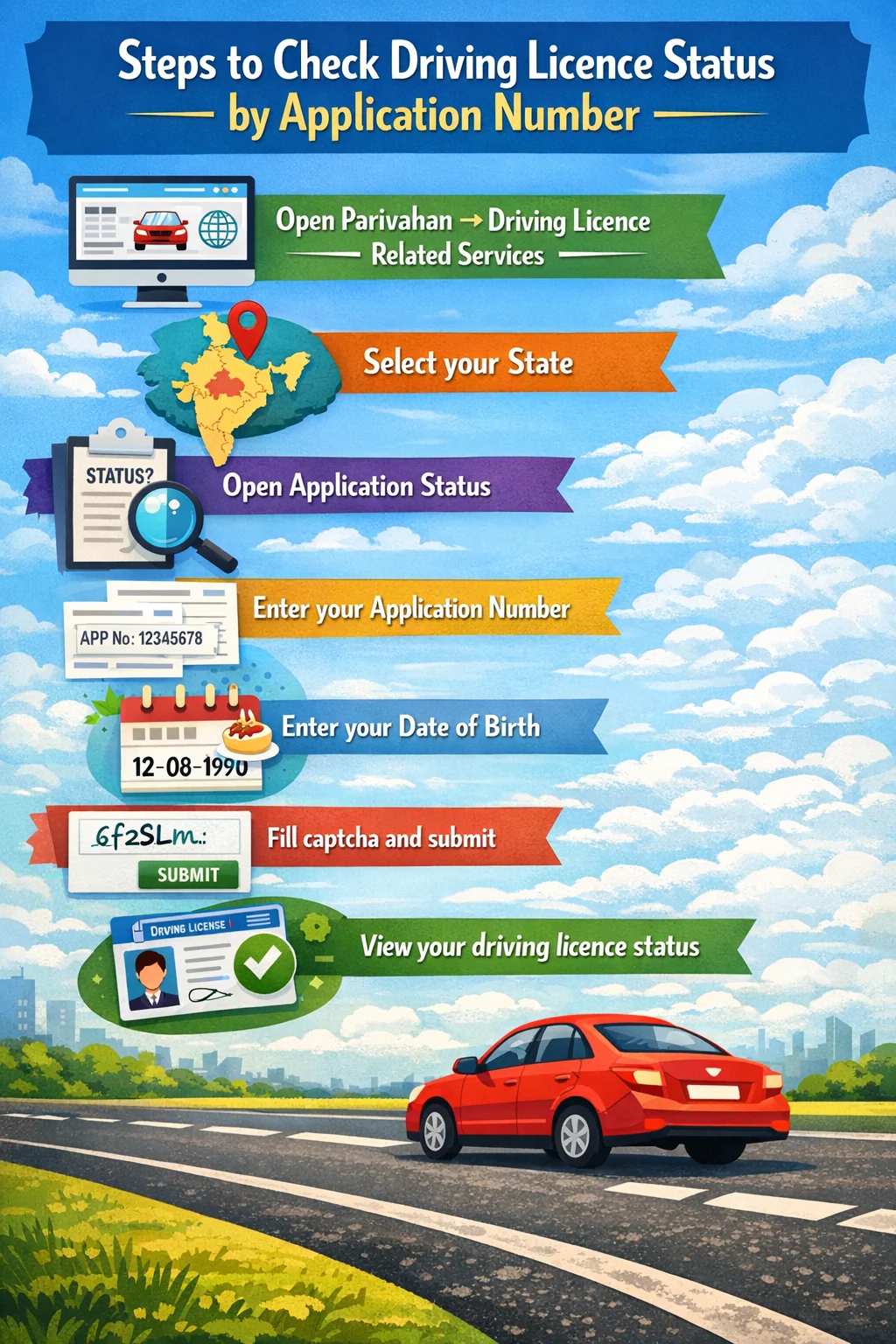
- Open Parivahan → Driving Licence Related Services
- Select your State
- Open Application Status
- Enter your Application Number
- Enter your Date of Birth
- Fill captcha and submit
- View your driving licence status
Common Mistakes (Why Status Doesn't Show)
If your status is not appearing, the most common reasons are: wrong application number entered, wrong date of birth, wrong state selected, application submitted recently (status not updated yet).
Track Driving Licence Status (Tracking Status & Progress)
Many people search terms like track driving licence status, driving licence tracking status, or know your driving licence status when their application is taking time or they want to confirm the next step.
Tracking your driving licence status simply means checking the current stage of your application regularly until it reaches: Approved → Printed → Dispatched → Delivered
How to Track Driving Licence Status Online
Use this method if you want to track updates daily or weekly:
- Go to Parivahan → Driving Licence Related Services
- Select your State
- Open Application Status
- Enter application number + DOB
- Check the latest status stage
What to Do If Your Driving Licence Status is Stuck
If your driving licence status has not changed for many days, it usually means one of these steps is pending: document verification pending, test result not updated, approval pending at RTO, printing not started, dispatch not initiated.
In such cases, you should: wait 2–3 working days (common delays), check again during non-peak hours, contact your RTO if status remains unchanged for a long time.
My Driving Licence Status Not Showing?
If you are checking my driving licence status and nothing appears, first confirm: you selected the correct state, the application number is correct, the DOB matches the application record.
mParivahan Driving Licence Status (Mobile App Method)
If you prefer mobile tracking, you can also check mParivahan driving licence status using the official government-supported app. It is useful for quickly viewing your driving licence details after approval and keeping a digital copy on your phone.
However, for detailed application-stage tracking, the Sarathi portal usually shows more complete updates.
Steps to Check Driving Licence Status on mParivahan
- Install the mParivahan app from Play Store / App Store
- Sign in using your mobile number (OTP verification)
- Open the Driving Licence section
- Enter your DL number (or add licence if already issued)
- View your licence details and available status information
What mParivahan Can Show
- Driving licence number and basic details
- Validity dates
- Issuing RTO
- Class of vehicle (MCWG, LMV, etc.)
- Digital DL card view
Driving Licence Delivery Status & Dispatch Status
After your driving licence application is approved, the next stages usually include printing and shipping. This is where users start searching for driving licence dispatch status and driving licence delivery status. These updates help you know whether your DL has been printed and sent to your address.
What is Driving Licence Dispatch Status?
Driving licence dispatch status means your driving licence has been: approved, printed (or printing completed), handed over for delivery through post/courier.
What is Driving Licence Delivery Status?
Driving licence delivery status means your DL has reached the final stage and is: delivered to your registered address, OR out for delivery (depending on tracking system).
How to Check Dispatch & Delivery Status
The most reliable method is:
- Go to Parivahan → Driving Licence Related Services
- Select your State
- Open Application Status
- Enter application number + DOB
- Check if the status shows printing/dispatch updates
Tip: If dispatch is completed but delivery is delayed, check your local post office or delivery tracking (if tracking number is shown).
RTO Driving Licence Status – What Happens After Approval?
Many users search RTO driving licence status when their application shows "approved" but the DL is still not received. This is normal because approval is not the final step — the application still needs to go through printing and dispatch.
What Happens After Your Driving Licence is Approved?
After approval, your application usually goes through these stages:
- Printing Initiated
- DL Printed / Smart Card Prepared
- Dispatch Initiated
- Sent via Post/Courier
- Delivered to Address
Why RTO Driving Licence Status May Take Time
Your DL may take longer due to: printing backlog at RTO, public holidays and weekends, incorrect or incomplete address, dispatch delay due to high workload, pending verification in the final stage.
What You Should Do
If your driving licence dispatch status is not updated even after many days: recheck status on Sarathi (correct state), confirm your address details in the application, contact your RTO if it stays stuck for a long time.
Driving Licence Status Not Showing? (Fix Guide)
If your driving licence status is not showing online, don't worry — this is a common issue on Parivahan/Sarathi, especially during peak traffic hours or when the application is newly submitted. Below are the most common reasons and the correct fixes.
How Long Does Driving Licence Status Take to Update?
The time taken for driving licence status to update depends on the service you applied for (new DL, renewal, duplicate, address change, etc.) and how quickly your RTO processes applications. Below is a general timeline so you can estimate when your status should move to the next stage.
Typical Processing Time for Driving Licence Status Updates
- Driving Licence Application Status (New DL): Usually takes 7–30 days, depending on test slot availability, verification, and RTO workload.
- Driving Licence Renewal Status: Usually takes 7–15 working days, depending on document verification and approval speed.
- Duplicate Driving Licence Status: Usually takes 7–20 working days, depending on verification and printing queue.
- Driving Licence Address Change Status: Usually takes 7–20 working days, because a new updated DL copy is issued.
- Driving Licence Dispatch Status (After Approval): Usually updates within 2–7 working days after approval/printing.
- Driving Licence Delivery Status: Usually takes 3–10 working days after dispatch, depending on postal delivery.
Related Driving Licence Services on Parivahan
After checking your driving licence status, you may also need other Parivahan/Sarathi services related to your DL application.
Popular Driving Licence Services (Parivahan / Sarathi)
- Apply for New Driving Licence
- Apply for Learning Licence (practice test & guide)
- Driving Licence Renewal
- Duplicate Driving Licence (Lost/Damaged DL)
- Driving Licence Address Change
- Driving Licence Download (Digital DL via mParivahan/DigiLocker)
- Driving Test Slot Booking
- DL Correction / Update Details (where available)
Tip: If your status shows "pending" or "rejected", these related services can help you fix the issue and reapply correctly.