E Challan Parivahan (Challan Check Online) – Check e Challan Status & E Challan Payment Online
Need to do a challan check or verify your e challan status? You can check traffic challans online using your vehicle number or driving licence number through the official e Challan Parivahan (e-challan-parivahan) system. This guide also explains how to pay challan online, Virtual Court challans, and Lok Adalat settlement.
Enter Vehicle Number
Trusted by citizens nationwide
What is e-Challan?
An e-Challan is a digital traffic challan issued by traffic police when a vehicle violates traffic rules like overspeeding, signal jump, no helmet, no seat belt, wrong parking, or invalid documents. Instead of a paper challan, the fine is recorded online in the government system.
In India, most challans are updated in the official e challan Parivahan database, so you can do an online challan check anytime using your vehicle number.
Challan Related Services
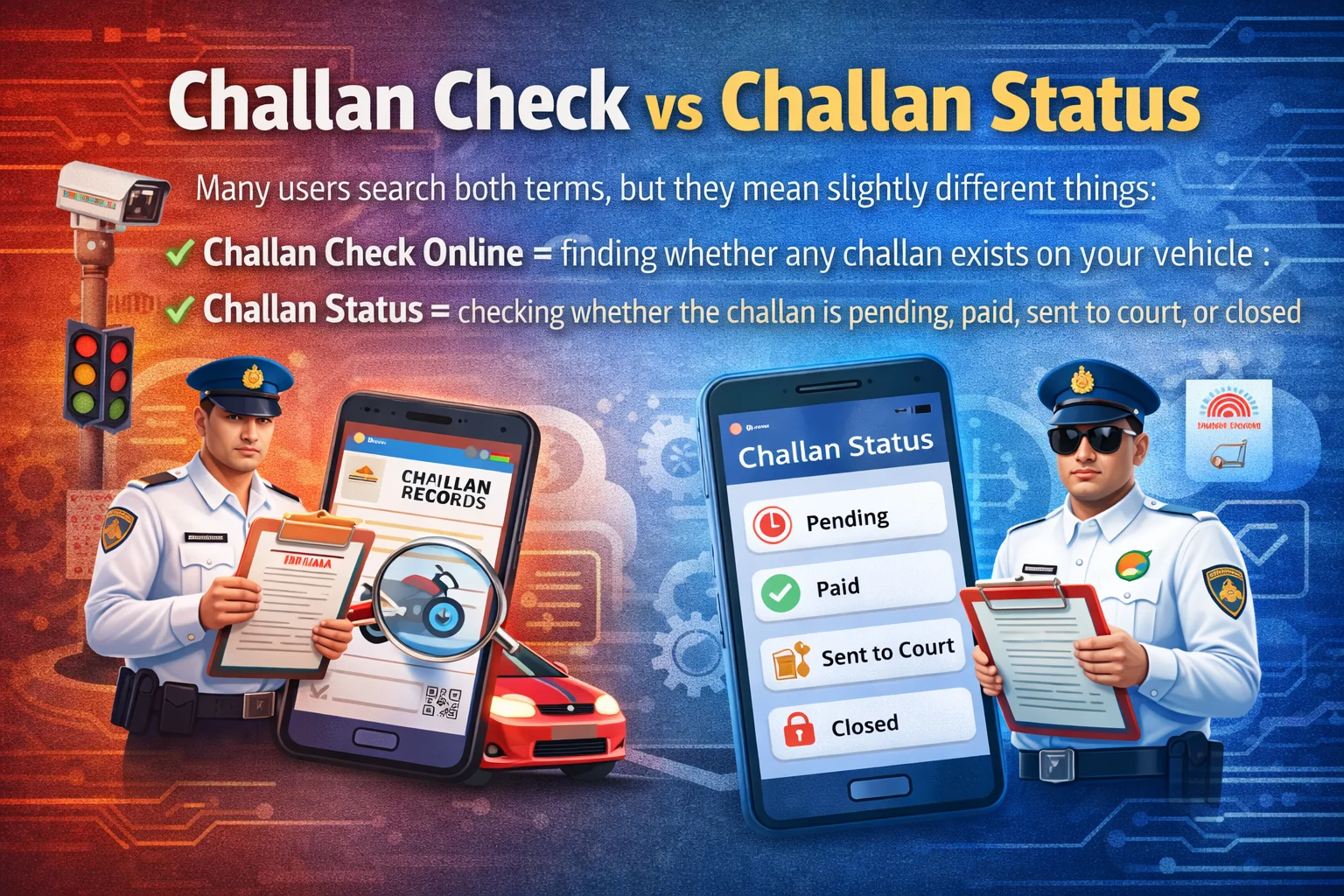
Challan Check vs Challan Status
Many users search both terms, but they mean slightly different things:
- Challan Check Online = finding whether any challan exists on your vehicle
- Challan Status = checking whether the challan is pending, paid, sent to court, or closed
What Details You Can See After Checking Challan
When you do a vehicle challan check, you usually see:
- Challan number
- Vehicle number
- Date & time of violation
- Location (city/area)
- Violation type (helmet, speed, signal etc.)
- Fine amount
- Payment status (Paid / Unpaid)
- Court status (if forwarded)
Who Can Use Online Challan Check?
You can do challan check online for:
- Bike challan check
- Car challan check
- Commercial vehicles (if supported)
- State traffic police challans (linked with Parivahan)
e Challan Check by Vehicle Number (Online Challan Check – Step-by-Step)
If you want to do e challan check by vehicle number, the best and most trusted method is using the official Parivahan eChallan portal. This works for most states in India and shows both challan check and challan status in one place.
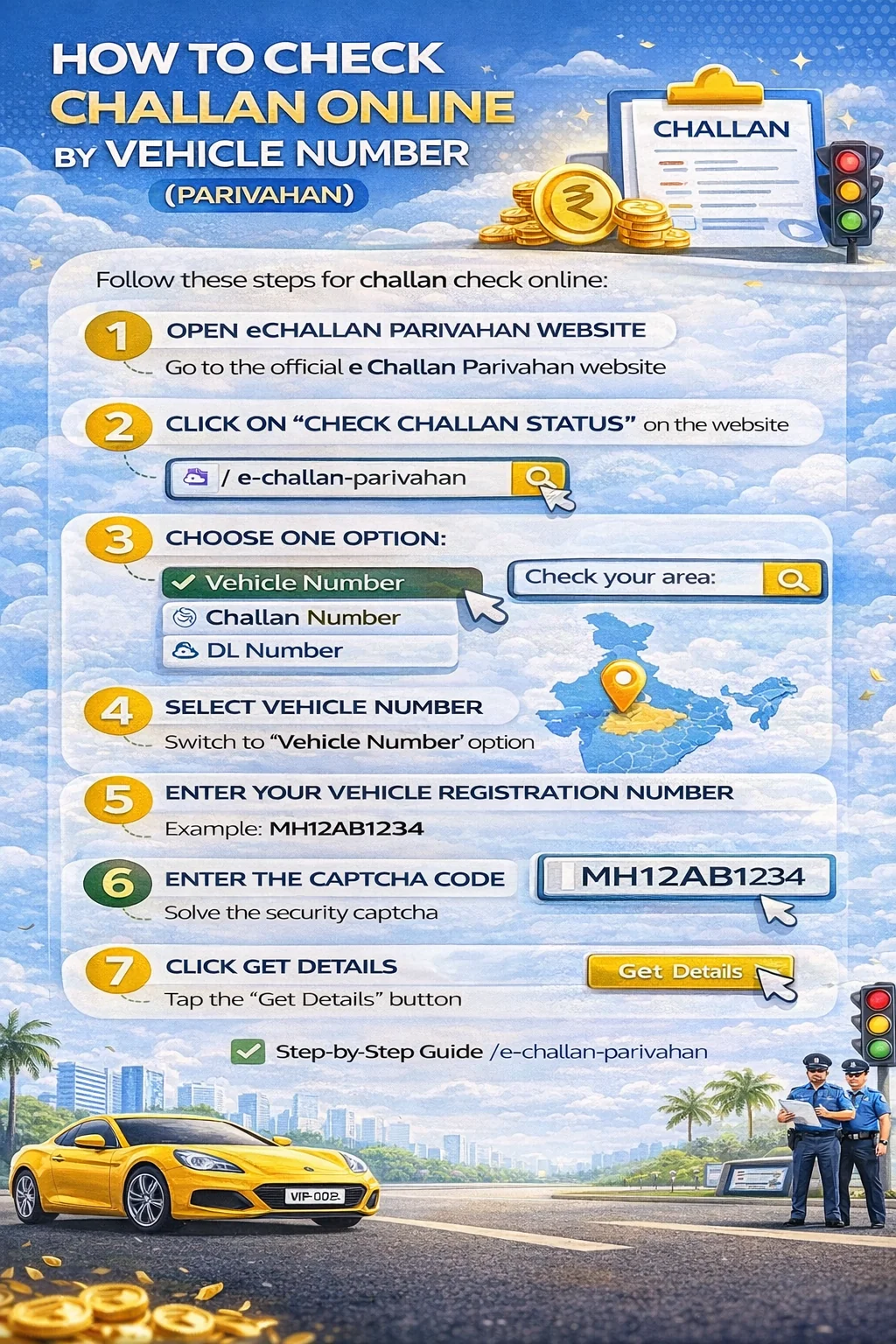
How to Check Challan Online by Vehicle Number (Parivahan)
Follow these steps for challan check online:
- Step 1: Open the official e challan Parivahan website
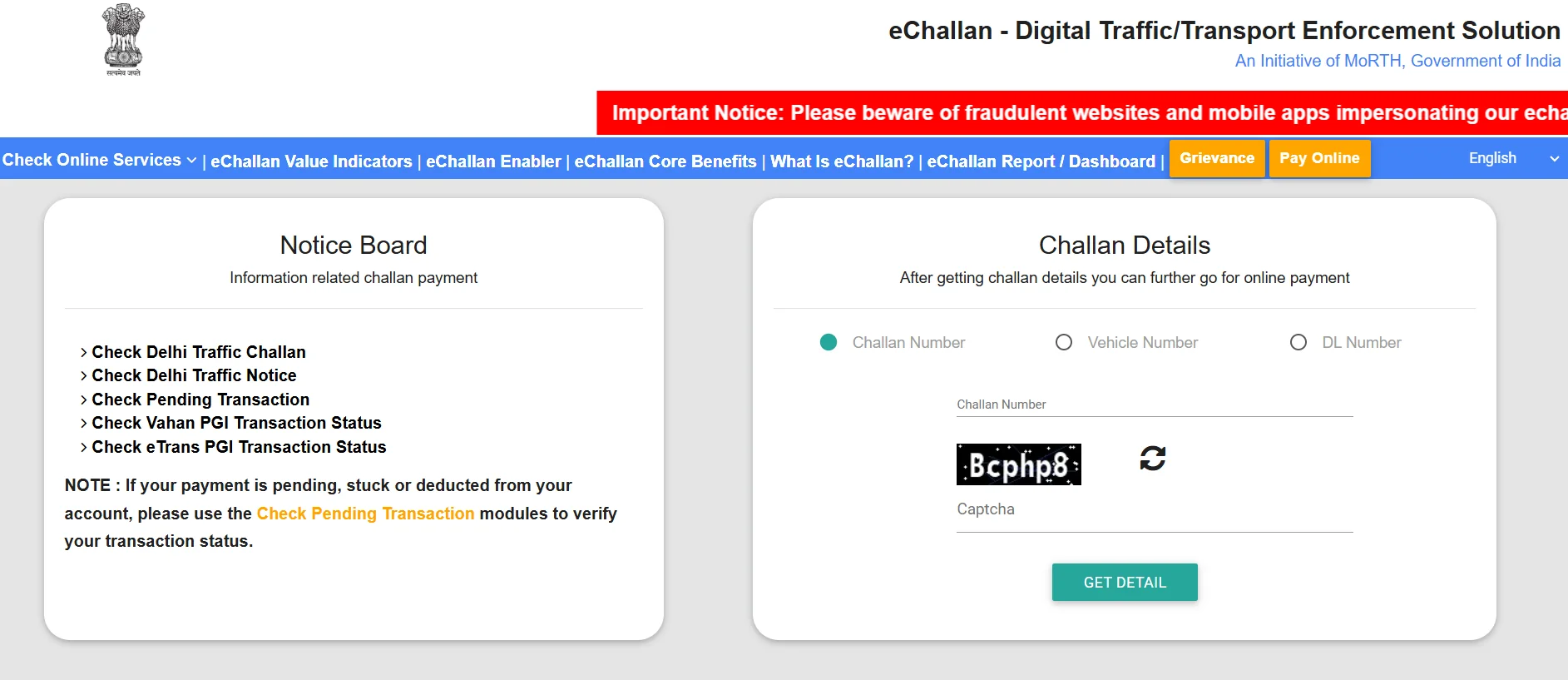
- Step 2: Click on "Check Pending Transaction"
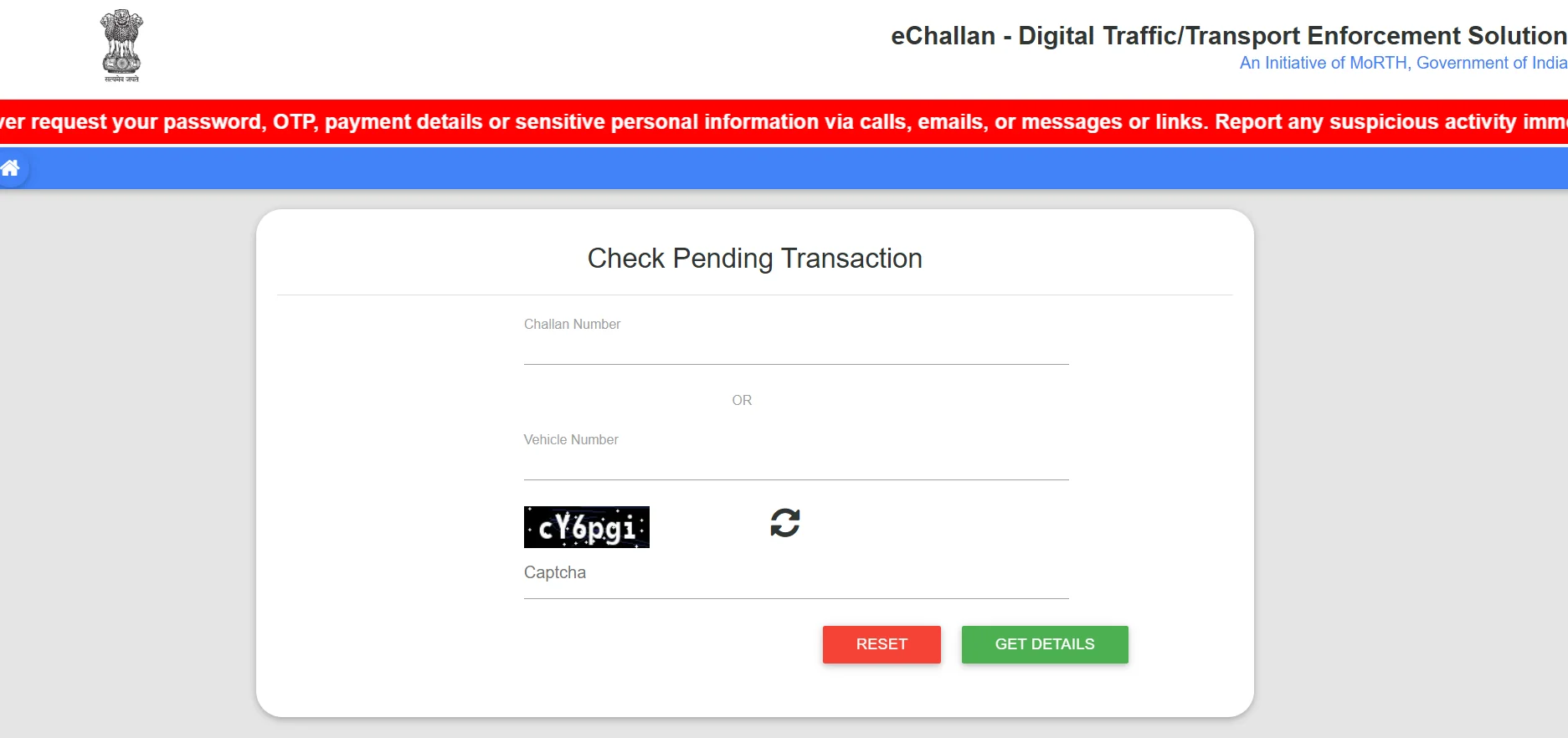
- Step 3: Choose one option: Vehicle Number / Challan Number / DL Number
- Step 4: Select Vehicle Number
- Step 5: Enter your Vehicle Registration Number (Example: MH12AB1234)
- Step 6: Enter the captcha code
- Step 7: Click Get Details
What You Will See After e Challan Status Check
After successful search, the portal will show:
- Pending challans (unpaid)
- Paid challans (history)
- Challan amount
- Violation details
- Court status (if any)
Best Tip (Avoid "No Record Found" Error)
If your challan is not showing: Enter vehicle number without spaces; don't use hyphens (MH-12-AB-1234 ❌); try again after 2–6 hours (upload delay is common).
Check e Challan Status Using Challan Number / DL Number (Step-by-Step)
If you don't want challan check by vehicle number, you can also do e challan status check using: Challan Number, or Driving Licence (DL) Number. This is useful when your vehicle number is not available, you got a challan slip message, or challan is linked to your DL.
1) e Challan Status Check by Challan Number
This is the most accurate method if you have the challan ID.
Steps
- Step 1: Open the official e challan Parivahan portal
- Step 2: Click Check Challan Status
- Step 3: Select Challan Number
- Step 4: Enter your Challan Number (from SMS or challan slip)
- Step 5: Enter captcha
- Step 6: Click Get Details
What You Can See:
challan amount, violation type, challan date/time, payment status, court status (if forwarded).
2) e Challan Check by DL Number (Driving Licence)
Many users search this as: e challan check, rto challan check, check challan status online
Steps
- Step 1: Open Parivahan eChallan portal
- Step 2: Click Check Challan Status
- Step 3: Select DL Number
- Step 4: Enter your Driving Licence Number
- Step 5: Enter captcha
- Step 6: Click Get Details
What It Shows:
challans linked to your DL, pending challan status, paid challan history (sometimes).
Important Note: If you check challan by DL number, you may not see all challans, because some challans are linked only to vehicle number, some only to challan number, and some states sync data late.
How to Pay Challan Online (Parivahan e Challan Pay) – Step-by-Step
If your e challan check shows a pending fine, you can easily pay challan online using the official e challan Parivahan portal. This is the safest method to complete Parivahan challan pay without visiting the traffic police office.
How to Pay e Challan Online (Official Parivahan Method)
Steps to Pay Challan Online
- Step 1: Open the official e challan Parivahan website
- Step 2: Go to e challan check / challan status
- Step 3: Choose how you want to search: e challan check by vehicle number (most common), Challan number, or Driving licence number (DL)
- Step 4: Enter captcha → click Get Details
- Step 5: Select the challan you want to pay
- Step 6: Click Pay Now
- Step 7: Complete payment using: UPI, Debit card, Credit card, Net banking
- Step 8: Download the receipt after successful payment
What Happens After You Pay Challan Online?
After payment, your e challan status usually updates within 10 to 60 minutes. You should always: save the challan payment receipt, keep the transaction ID, re-check challan status online after some time.
Payment Deducted but Challan Not Paid? (Common Issue)
This is a very common problem during online challan payment. Why it happens: server delay on Parivahan, payment gateway timeout, slow internet during transaction, session expired before confirmation.
What to do: wait 30–60 minutes; check e challan status again; do not pay again immediately; if amount is deducted, refund is usually processed automatically in 3–7 working days.
Court Challan / Virtual Court Challan (Important)
Sometimes your challan will show: Sent to Court, Court Pending, Virtual Court. In such cases, normal Parivahan challan pay may not work. Then you must pay through: Virtual Court Challan, Online Court Challan portal, or Lok Adalat.
Tip (Important for Users): For safety, traffic police usually accepts only: challan paid receipt, updated e challan status as "Paid", official payment proof (not edited screenshots).
Virtual Court Challan, Online Court Challan & Lok Adalat (E-Challan Payment Guide)
Sometimes while doing e challan check on Parivahan, your challan will not show a normal "Pay Now" option. Instead, it may show statuses like Sent to Court, Virtual Court, or Court Pending. In such cases, you cannot pay the challan on Parivahan directly — you must pay it through the Virtual Court challan portal or settle it in Lok Adalat (if available).
What is Virtual Court Challan?
A Virtual Court challan is an online court system where traffic challans are sent for digital processing. When your challan is marked as court challan, it means the case has moved to a court workflow and payment is handled under the Virtual Court system.
When Challan Goes to Virtual Court?
Your e challan may be transferred to Virtual Court when: the challan is for a serious traffic violation; there are multiple unpaid challans on the same vehicle; the challan is pending for a long time without payment; your state traffic department sends challans directly to Online Court / Virtual Court (state-wise rule). So if your e challan status shows "Sent to Court", "Virtual Court", or "Court Pending", it is normal — and payment must be done through the Virtual Court portal, not Parivahan.
Challan Status Meaning (Most Important for Users)
- Payment Pending → You can pay normally online
- Sent to Court → Payment must be done via Virtual Court
- Court Pending → Challan is under review, payment may not open instantly
- Disposed → Challan is closed (paid/settled)
- Cancelled → Challan removed from system
- Payment Failed → Retry payment after some time
How to Pay Virtual Court Challan Online (Step-by-Step)
- Step 1: Open the official Virtual Court portal
- Step 2: Select your State
- Step 3: Choose Traffic Challan / e-Challan section
- Step 4: Enter your details (Vehicle number, OR Challan number, OR DL number)
- Step 5: Check challan details and fine amount
- Step 6: Click Pay Now and complete payment via UPI/card/netbanking
- Step 7: Download payment receipt after successful payment
Why You Cannot Pay Court Challan on Parivahan? Parivahan works mainly for: e challan check, challan status, normal challan payment. But once challan is moved to court, Parivahan only shows status — payment is controlled by court systems.
What is Lok Adalat in Traffic Challan?
Lok Adalat is a legal settlement system where traffic challans can sometimes be resolved at a reduced penalty amount (depends on state + case type). Lok Adalat is useful for: multiple pending challans, old challans, court challan settlement, reducing penalty (if allowed).
How Lok Adalat Works for E-Challan (Simple)
- Step 1: Check your challan status online
- Step 2: If eligible, your challan may show Lok Adalat option (state-wise)
- Step 3: Attend Lok Adalat hearing (offline or online depending on state)
- Step 4: Pay the settlement amount
- Step 5: Challan gets closed as Disposed
Note: Not every challan is eligible for Lok Adalat.
Quick Tip:
If Parivahan challan payment is not working, do this in order: Check e challan status again after 30 minutes; If it shows Sent to Court → pay via Virtual Court challan; If payment is pending but fails → retry in non-peak hours; If you have many challans → check Lok Adalat option.
e Challan Payment Deducted But Not Updated? (Payment Failed Fix)
Sometimes your payment is deducted, but the e challan status still shows Unpaid / Pending. Why: Parivahan server delay (high traffic), Bank/UPI success but Parivahan not confirmed, Payment gateway timeout, Session expired during payment, Network issue while redirecting back.
What to Do If Payment Is Deducted But Challan Still Unpaid
- Step 1: Wait 30–60 minutes (status update delay is common)
- Step 2: Check challan again using vehicle number
- Step 3: Check bank statement / UPI history for transaction status
- Step 4: Search again using challan number (sometimes vehicle search shows delay)
- Step 5: If still unpaid after 24 hours, keep payment proof ready
Refund Timeline (If Payment Failed):
If payment was deducted but challan is not generated, refund usually comes in 3 to 7 working days (depends on bank / UPI provider).
Important Proof You Must Save:
- UPI transaction ID / bank reference number
- Date & time of payment
- Challan number
- Screenshot of payment success page
How to Download e Challan Receipt (Payment Proof PDF)
After you pay challan online, you should always download the e challan receipt as proof of payment. This receipt is useful for: traffic police verification, court/virtual court proof, refund issues, challan dispute.
Steps to Download e Challan Payment Receipt (Parivahan)
- Step 1: Open e challan parivahan portal
- Step 2: Go to Check Challan Status
- Step 3: Enter Vehicle Number / Challan Number / DL Number
- Step 4: Open your challan details
- Step 5: If status shows Paid, click Receipt / Print / Download
- Step 6: Save it as PDF
If Receipt Download Option Is Not Showing:
Wait 30–60 minutes (server delay); Try again in Chrome browser; Check from another device; Search using challan number instead of vehicle number.
e Challan Status Showing Pending in Virtual Court (What It Means)
If your e challan status shows "Pending in Virtual Court", it means your challan is not payable directly on Parivahan right now because it has been forwarded to the Virtual Court for decision. This usually happens for: serious traffic violations, repeated challans on the same vehicle, challan pending for a long time, state-specific court rules. Important: This is normal and does not mean your challan is fake.
What You Should Do (Steps)
- Step 1: Do e challan check again on Parivahan
- Step 2: Note the challan number + offence details
- Step 3: Open the Virtual Court website (as shown in status)
- Step 4: Search using challan number / vehicle number
- Step 5: Pay the challan online (if payment option is available)
- Step 6: Download the payment receipt
Can I Pay Virtual Court Challan Online?
Yes, in most cases you can pay it online through the Virtual Court portal. If payment is not allowed online, you may need to follow court instructions.
Lok Adalat Challan (What It Is + How It Works)
If your challan status shows words like "Lok Adalat", it means your traffic challan may be eligible for settlement through Lok Adalat, where fines are sometimes reduced and cases are closed faster. Lok Adalat is mainly used for: old pending challans, multiple challans on the same vehicle, challans already moved to court / virtual court, cases where the state announces Lok Adalat dates.
How to Check if Your Challan is in Lok Adalat (Steps)
- Step 1: Do e challan check on Parivahan
- Step 2: Open challan details and check status text
- Step 3: If it shows Court / Virtual Court / Lok Adalat, note challan number
- Step 4: Search on Virtual Court portal using challan number or vehicle number
- Step 5: If Lok Adalat option is available, you will see: hearing date, settlement amount (if provided), payment instructions
Can I Pay Lok Adalat Challan Online? Yes, in many states Lok Adalat challans can be paid online via Virtual Court. Some cases require physical presence on the Lok Adalat date.
Why Lok Adalat is Helpful: challan case closes quickly; reduces long pending challans; may reduce fine in some cases.
Online Court Challan vs Virtual Court Challan
| Point | Online Court Challan | Virtual Court Challan |
|---|---|---|
| Meaning | Challan forwarded to traffic court, official court process | Challan handled digitally via Virtual Court portal (in most cases) |
| Where it shows | Court Pending / Sent to Court | Virtual Court / VC / Court Case |
| Payment option | Sometimes online payment not allowed directly | Usually allows online payment if eligible |
| Hearing requirement | May require physical hearing | Mostly no physical hearing unless court demands |
| Best action | Check challan status and follow court instructions | Open Virtual Court portal → check case → pay online if allowed |
| Who handles it | Local traffic court / magistrate | Virtual Court system (state-wise) |
| Can fine reduce? | Possible through court decision | Possible via Lok Adalat or court settlement (state-wise) |
Challan Not Showing Online?
Sometimes your challan check online shows "No Record Found" even when you know a challan exists. This usually happens due to server delay, wrong vehicle number format, or state-level data sync issues.
Why e Challan is Not Showing
- Challan is not uploaded yet (common delay: 2–24 hours)
- Vehicle number entered in wrong format (spaces/hyphen issue)
- Challan is linked only with challan number, not vehicle number
- Parivahan server is slow or under maintenance
- Some challans may appear only on state traffic police portals first
Fix (Try This Order)
- Step 1: Enter vehicle number without spaces (MH12AB1234)
- Step 2: Try challan number search (if you got SMS)
- Step 3: Try DL number search
- Step 4: Retry after 2–6 hours
- Step 5: If still not showing after 24 hours, check state traffic portal (if applicable)
Wrong Challan / Challan Dispute (How to Raise Complaint)
If your e challan status shows a challan that is incorrect (wrong vehicle, wrong violation, or duplicate challan), you should not pay it blindly.
Common Reasons of Wrong Challan
- Wrong vehicle number captured by camera
- Duplicate challan generated for the same violation
- Wrong location/time recorded
- Challan issued even after valid documents
- Number plate misread (0 vs O)
What You Should Do
- Step 1: Open challan details on Parivahan
- Step 2: Check violation type, location, date/time
- Step 3: Look for evidence/photo (if available)
- Step 4: Save challan number + screenshot
- Step 5: Contact traffic police helpdesk (state-wise) or follow court instructions if it is a court challan
Important: If challan is already marked Sent to Court / Virtual Court, dispute process is handled via court workflow, not normal payment.
Common Traffic Challans in India
When you do a challan check online on the e challan Parivahan portal, most challans fall under common traffic violations. Note: Challan amount may vary state-wise and can increase for repeat offences or court challans.
| Violation (Challan Reason) | Common For | Estimated Amount (₹) | What You Should Do |
|---|---|---|---|
| No Helmet | Bike challan check | 500 – 2,000 | Pay challan + wear helmet |
| No Seat Belt | Car challan check | 500 – 1,000 | Pay online + avoid repeat |
| Red Light Jump | Traffic challan check | 500 – 2,000 | Pay quickly, check photo proof |
| Overspeeding | Vehicle challan check | 1,000 – 5,000 | Pay online / Virtual Court if sent |
| Wrong Parking | Online challan check | 100 – 1,000 | Pay + avoid same location |
| Driving Without Insurance | RTO challan check | 2,000 – 4,000 | Renew insurance immediately |
| Driving Without PUC | Challan status check | 1,000 – 10,000 | Update PUC + keep proof |
| Driving Without RC | Vehicle challan check | 500 – 5,000 | Download RC in DigiLocker |
| Driving Without DL | e challan status | 5,000+ | Download DL + avoid driving without it |
| Using Mobile While Driving | Traffic challan check | 1,000 – 5,000 | Pay + avoid repeat |
| Dangerous / Rash Driving | Court challan | 1,000 – 10,000+ | Often goes to Virtual Court |
| Triple Riding (2-Wheeler) | Bike challan check | 500 – 2,000 | Pay + avoid repeat |
Why These Challans Are So Common: CCTV cameras at signals, ANPR cameras (vehicle number detection), highway speed monitoring, document checks (PUC, insurance, RC, DL), repeat violations on the same vehicle. That's why challan check by vehicle number is the most accurate method.
Related Services
If you are checking challan status, you may also need these official vehicle services: