Driving Licence Download Online (DL PDF Download) – Parivahan, DigiLocker & mParivahan
Need a driving licence download for your bike or car? You can now download your driving licence PDF online using official government platforms like DigiLocker, mParivahan, and Sarathi Parivahan.
This guide will help you:
- Download driving licence online (PDF + mobile)
- Get e driving licence download through DigiLocker
- Add your DL in mParivahan (virtual driving licence)
- Download duplicate driving licence copy if lost
- Fix common errors like DL not found, OTP issue, or server problem
Note: We do not create or print licences. This guide only explains official government methods.
What is Driving Licence Download? (Soft Copy / PDF / Digital)
A driving licence download simply means getting a digital copy of your licence online so you can view it anytime on your phone or save it as a PDF. In India, your DL details are stored in the government database, and platforms like Sarathi Parivahan, DigiLocker, and mParivahan allow you to access them.
Most people download their driving licence for:
- traffic police checking
- job or ID verification
- insurance renewal / claims
- keeping a backup if the licence is lost
- downloading a driving licence PDF for records
Is Driving Licence Download Online Valid?
Yes. A driving licence available in DigiLocker or mParivahan is legally valid because it is fetched directly from official government records.
Important: Traffic police usually do not accept:
- screenshots
- edited PDF copies
- random "DL image download" files
To stay safe, always open your licence directly inside:
Best Way to Download Driving Licence (Which Method Should You Use?)
There are multiple official ways to download your driving licence online, but the best option depends on what you need — a PDF download, a virtual driving licence, or Parivahan service tracking.
Quick Answer (Most Users)
- Driving licence download PDF → Use DigiLocker
- Digital / virtual driving licence download → Use mParivahan
- Parivahan driving licence download + services → Use Sarathi Parivahan
| What you need | Best method |
|---|---|
| Driving licence PDF download | DigiLocker |
| Driving licence on mobile for traffic police | mParivahan |
| DL services, correction, renewal, duplicate | Sarathi Parivahan |
| DL not showing in one method | Try the other method |
Method 1 – Driving Licence Download PDF via DigiLocker (Steps)
If your main goal is driving licence download PDF, DigiLocker is the best and most reliable option. It fetches your licence directly from the official government database, so it is widely accepted for verification.
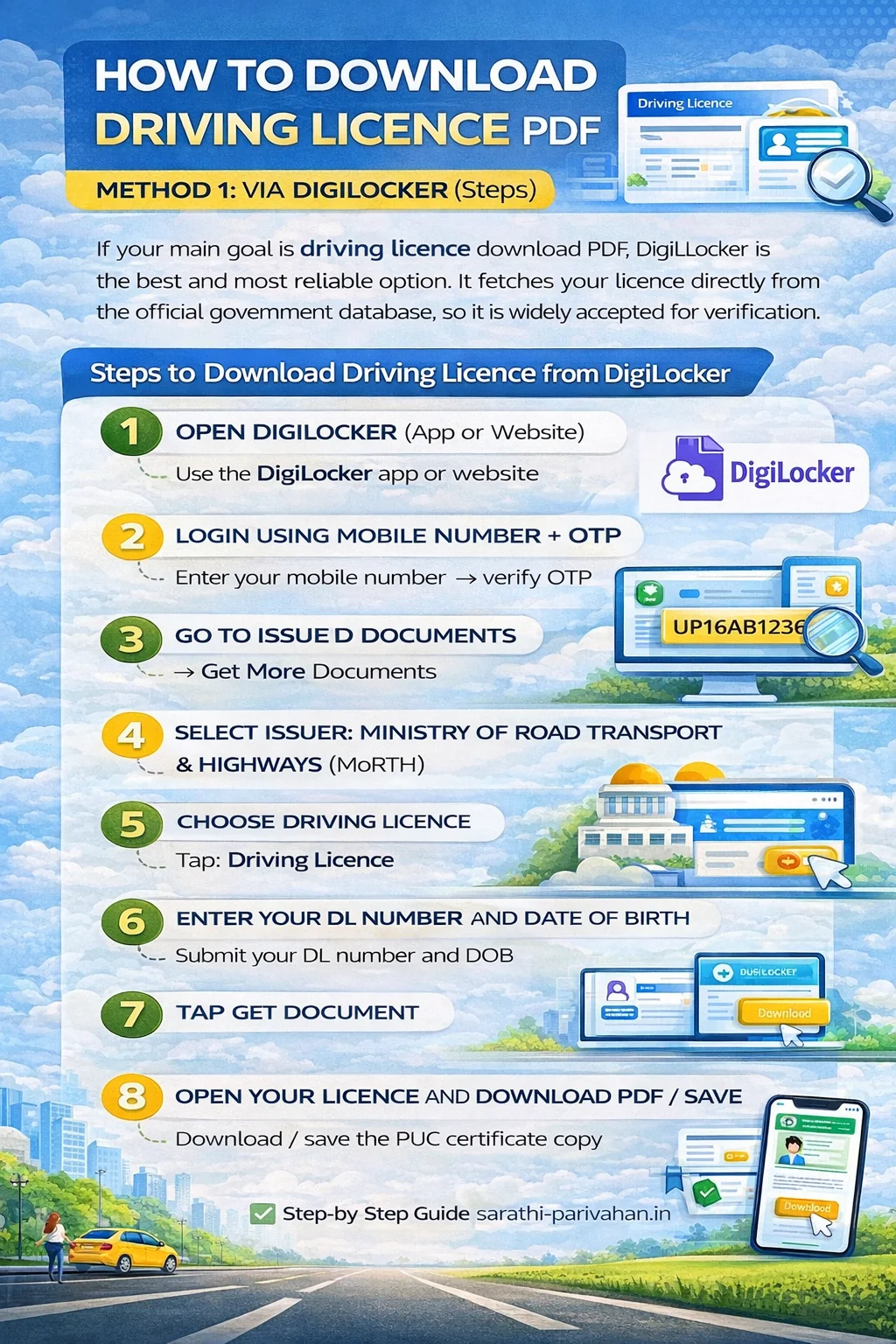
Steps to Download Driving Licence from DigiLocker
- Step 1: Open DigiLocker (App or Website)
- Step 2: Login using your mobile number and OTP
- Step 3: Go to Issued Documents → Get More Documents
- Step 4: Select issuer: Ministry of Road Transport & Highways (MoRTH)
- Step 5: Choose Driving Licence
- Step 6: Enter your DL number and Date of Birth
- Step 7: Tap Get Document
- Step 8: Open your licence and Download PDF / Save
This is the best method for users searching: driving licence download, driving licence download pdf, and download driving licence pdf.
Method 2 – Digital / Virtual Driving Licence Download via mParivahan
mParivahan is the official transport app used for storing your digital driving licence and showing it during traffic checks. It is best if you want your licence always available on your phone without downloading a PDF. Install from Play Store or App Store.
Steps to Download Driving Licence in mParivahan
- Step 1: Install and open the mParivahan app
- Step 2: Login using your mobile number → verify OTP
- Step 3: Tap on Driving Licence
- Step 4: Select Add / Link Driving Licence
- Step 5: Enter your DL number and Date of Birth
- Step 6: Verify OTP (if asked)
- Step 7: Your virtual driving licence will appear in the app
Method 3 – Parivahan Driving Licence Download (Sarathi Portal)
Many users search "Parivahan driving licence download" expecting a direct PDF file. But the Sarathi Parivahan portal is mainly used for DL services, not always for clean PDF downloads like DigiLocker.
What Sarathi Parivahan is Best For
- Checking DL status and application progress
- Renewal and duplicate DL services
- Correction (name, address, DOB)
- Slot booking for driving test
- Tracking DL dispatch and approval
Steps to Access Driving Licence Services on Sarathi
- Step 1: Open Sarathi Parivahan and select your State
- Step 2: Click Driving Licence Related Services
- Step 3: Enter your DL number / Application number and Date of Birth
- Step 4: Submit and proceed to view available options
- Step 5: Use download/print option (if available) or track service status
Method 4 – Driving Licence Download via UMANG App
UMANG is a government app that provides access to Sarathi driving licence services in one place. It is useful if you want to check DL details quickly without opening multiple websites.
Steps to Download Driving Licence Using UMANG
- Step 1: Install the UMANG app and login with mobile number
- Step 2: Search for Driving Licence
- Step 3: Select the driving licence service
- Step 4: Enter your DL number and Date of Birth
- Step 5: View your DL details and download/save if the option is available
How to Download Driving Licence Without DL Number (DL Number Recovery)
Many users search "driving licence download without DL number", but the truth is: You cannot download your driving licence PDF without DL number in DigiLocker or mParivahan. First you must find/recover your DL number, then you can download it.
How to Recover DL Number (Official Ways)
You can recover your driving licence number using:
Method 1: Sarathi Parivahan "Find Application / DL Number"
- Select your state on Sarathi portal
- Use your details like: Name, Date of birth, Mobile number (if linked)
- Get your DL number and then download DL
Method 2: Visit Your RTO (For Very Old DL)
If your licence is too old and not in the database, the RTO can help you verify and retrieve it.
Tip: Once you get the DL number, the easiest method for driving licence download PDF is DigiLocker.
Driving Licence Download Using Mobile Number (Reality + Correct Method)
A lot of people search "driving licence download using mobile number", but you should clearly mention this:
❌ You cannot directly download driving licence PDF only by mobile number in DigiLocker.
Mobile number is mainly used for OTP login, not for fetching DL.
When Mobile Number Helps in DL Download
You can download your driving licence using mobile number only if your mobile is already linked with your DL record.
Best Method (Official) – Sarathi Parivahan (State Portal)
- Select your state
- Open Driving Licence Related Services
- Enter: DL Number (or application number), Date of Birth. If required, OTP may come on your linked mobile number
If Mobile Number Is Not Linked
If your mobile number is not linked with your DL: OTP may fail; DL may not show in mParivahan; You may need to update mobile number via RTO service.
Tip: For fastest driving licence download online, always use DL number + DOB.
Driving Licence Download for Old Licence (Paper DL Not Found Issue)
Many users face this problem while doing driving licence download online: Driving licence not found, Old driving licence not showing in DigiLocker, DL not showing in mParivahan. This usually happens for old paper driving licences issued years ago.
Why Old Driving Licence Is Not Showing Online?
- Your DL record is not fully updated in the Sarathi database
- The licence was issued in the old offline RTO system
- Your state data migration is still pending
- DL number format is old or mismatched
Virtual Driving Licence (mParivahan) – What It Is & How It Works
A virtual driving licence is a digital version of your DL that stays saved inside the official mParivahan app. It is mainly used for traffic police checking, because it is linked directly to the government database and shows your licence in a verified format.
Why People Prefer Virtual DL
- You don't need to carry your physical card daily
- Easy to show during traffic checking
- Works even if you don't have a PDF saved
How to Get Virtual Driving Licence in mParivahan (Steps)
- Step 1: Install mParivahan and login using your mobile number
- Step 2: Open Driving Licence section
- Step 3: Tap Add / Link Driving Licence
- Step 4: Enter your DL number and Date of Birth
- Step 5: Verify OTP (if asked)
- Step 6: Your virtual driving licence will appear in the app
Important Note: A virtual DL is valid only when shown inside the mParivahan app. Screenshots are often not accepted.
What to Do If Your Old DL Is Not Found (Best Fix Order)
Follow this order:
- Step 1: Check DL on Sarathi Parivahan (state portal)
- Step 2: Try mParivahan for virtual driving licence
- Step 3: Try DigiLocker DL PDF download again after some time
- Step 4: If still not found, visit your RTO for DL record update / digitisation
Important Note: If your driving licence is very old, it may not be available for DL PDF download until the record is updated in Sarathi.
DigiLocker DL Not Showing / Not Found (Very Common)
Why Driving Licence is Not Showing in DigiLocker?
Your driving licence may not appear in DigiLocker because:
- Your DL is very old (data not synced)
- DL number format entered wrong
- DOB mismatch with Sarathi record
- Temporary MoRTH/Sarathi server issue
Quick Fix (Works for Most Users)
Try this in order:
- Enter DL number without spaces
- Check DOB format carefully
- Try again after 30–60 minutes
- If still not found → use mParivahan
- If still not showing → check on Sarathi (state portal)
Best Tip: If DigiLocker fails, many times mParivahan fetches the DL faster.
Duplicate Driving Licence Download (Lost / Damaged DL)
If your licence is lost, damaged, or unreadable, many users search for driving licence duplicate copy download or duplicate driving licence download. But it's important to understand one thing clearly:
If your DL is already available digitally
You can access it instantly using: DigiLocker (best for PDF), mParivahan (best for mobile). In most cases, this is enough for traffic police checking and daily use.
❌ If your DL is NOT available digitally
Then you cannot directly "download" it. You must apply for a Duplicate Driving Licence through Sarathi Parivahan.
Steps to Apply for Duplicate Driving Licence (Sarathi)
- Step 1: Open Sarathi portal and select your State
- Step 2: Go to Driving Licence Related Services
- Step 3: Enter DL number + DOB and proceed
- Step 4: Select service: Issue of Duplicate DL
- Step 5: Fill the form and upload documents (if required)
- Step 6: Pay the fee online
- Step 7: Book appointment (if your state requires it)
- Step 8: Track the application status later
You can check driving licence status.
Learning Driving Licence Download (LL Download)
Many users also search learning driving licence download when they want a copy of their Learner's Licence (LL). A learner licence is issued online after approval and is usually available for download through the Sarathi portal.
Steps to Download Learning Licence (LL) Online
- Step 1: Open Sarathi Parivahan and select your State
- Step 2: Go to the Learner Licence section
- Step 3: Choose the option to print/download LL (wording may vary)
- Step 4: Enter your LL application number and Date of Birth
- Step 5: Submit and download/print the learner licence copy
Driving Licence Card Download / Smart Card Download (Important Clarity)
Many people search for download driving licence card or driving licence smart card download, but there is one important truth: You can download a digital DL, but you cannot download a smart card. A smart card driving licence is a physical PVC card issued by the RTO. It cannot be downloaded like a PDF file.
What you CAN download instead
You can still access a valid digital copy using: DigiLocker → for driving licence PDF download; mParivahan → for virtual driving licence download. So if your goal is a DL copy for verification or traffic checks, DigiLocker and mParivahan are the correct official options.
Driving Licence Download Not Working? (Common Problems + Quick Fix)
If your driving licence download online is not working on DigiLocker, mParivahan, or Sarathi, don't worry — it's very common due to server load or old licence data. Use these quick fixes.
1) Driving Licence Not Found in DigiLocker
Why it happens: Wrong DL number format; Old driving licence records not synced; Temporary Parivahan database issue.
Quick fix: Enter DL number exactly as printed (no spaces). Try again after 30 minutes. If still not found, use mParivahan or Sarathi.
2) Driving Licence Not Showing in mParivahan
Why it happens: OTP verification issue; Server overload; DOB mismatch.
Quick fix: Retry after 10–15 minutes. Try late night / early morning. If still not showing, download DL PDF using DigiLocker.
3) OTP Not Received (DigiLocker / mParivahan)
Why it happens: SMS delay; High traffic on servers.
Quick fix: Wait 2–5 minutes. Tap resend OTP. Try again later (non-peak hours work best).
4) Driving Licence PDF Download Not Opening
Why it happens: Incomplete download; Browser cache issue; Phone storage issue.
Quick fix: Download again using Wi-Fi. Use Chrome browser. Open using any PDF reader.
5) Driving Licence Details Wrong (Name / DOB / Address)
Why it happens: Correction request pending; Old data not updated in Sarathi.
Quick fix: Check status first → DL status. If status is approved but details still wrong, visit your RTO.
What You Need Before Downloading Driving Licence Online
To avoid errors like DL not found, OTP issues, or verification failure, keep these details ready before starting your driving licence download.
Required (Always Needed)
- Driving licence number (correct format)
- Date of birth (same as DL record)
- Mobile number for OTP login (DigiLocker / mParivahan)
Sometimes Required
- Application number (if DL number is not available)
- Access to OTP (if verification is asked again)
Tip: If your DL is very old, DigiLocker may not fetch it instantly — in that case, try Sarathi or mParivahan.
Driving Licence Number Format (DL Number Example + Common Mistakes)
Before you start your driving licence download online, make sure you enter your DL number in the correct format. A small mistake in DL number is the most common reason why DigiLocker or mParivahan shows "Record Not Found".
DL Number Format (Examples)
Driving licence numbers are usually written like: MH1420110065432, DL0420150001234, KA0520120098765. Some older licences may have a slightly different format, but the safest method is to enter the DL number exactly as printed on your licence.
Common Mistakes to Avoid
- Don't add spaces (❌ MH14 2011 0065432)
- Don't use hyphens (❌ MH-14-2011-0065432)
- Don't confuse O with 0 (letter O vs zero)
- Enter the correct Date of Birth as per DL record
Related Parivahan Services
Use these internal links for RC, DL, PUC, eChallan and more.