Driving Licence Slot Booking – Book DL & LL Test Slot Online on Parivahan
Driving licence slot booking is the official process to book an appointment for your learning licence test (LL test) or driving licence test (DL test) through the government portal. In most states, you can book your slot online using Parivahan Sewa and the Sarathi portal, choose a date and time, and download the appointment slip for your RTO visit.
This guide explains how to book a driving licence slot online, how to reschedule or cancel your slot, what documents to carry, fees, and the most common slot booking problems with fixes.
Book Driving Licence Slot Online
You can book your driving licence slot online using:
- Application Number
- Date of Birth
- State Selection (because Sarathi works state-wise)
You can book slots for:
- Learning Licence Slot Booking (LL Test Slot)
- Driving Licence Test Slot Booking (DL Driving Test Appointment)
What is Driving Licence Slot Booking and Why It's Required?
Driving licence slot booking is a system that allows applicants to select a time and date for:
- learning licence test
- driving licence driving test
- document verification (in some states)
It is required because:
- RTOs handle thousands of applications daily
- slot booking avoids long queues
- your test can only be taken on an allotted appointment
In simple words, without booking a slot, you may not be allowed to appear for your LL/DL test.
Types of Driving Licence Slot Booking
1) Learning Licence Test Slot Booking (LL Slot)
This is for applicants who want to take the learner licence test. The test is usually: online computer-based (in many RTOs), based on traffic rules and road signs.
2) Driving Licence Test Slot Booking (DL Slot)
This is for applicants who already have a learner licence and want to take the driving test for a permanent licence.
3) DL Renewal Appointment Slot (If Applicable)
Some states also show appointment slots for: DL renewal, address change, document verification. (Availability varies by state.)
What You Need Before Booking a Driving Licence Slot
Before starting slot booking, keep these ready:
- Application Number (from Sarathi acknowledgement)
- Date of Birth (as per application)
- Correct State Selection
- Fee payment receipt (if your state requires payment before booking)
- A stable internet connection (Sarathi may time out)
Documents You Should Keep (For Test Day)
You will need these later at the RTO:
- acknowledgement slip / appointment receipt
- original ID proof
- address proof
- learner licence print (if applicable)
- medical certificate (only for specific categories/age)
How to Book Driving Licence Slot Online on Parivahan (Sarathi)
This is the most official and reliable method for driving licence slot booking.
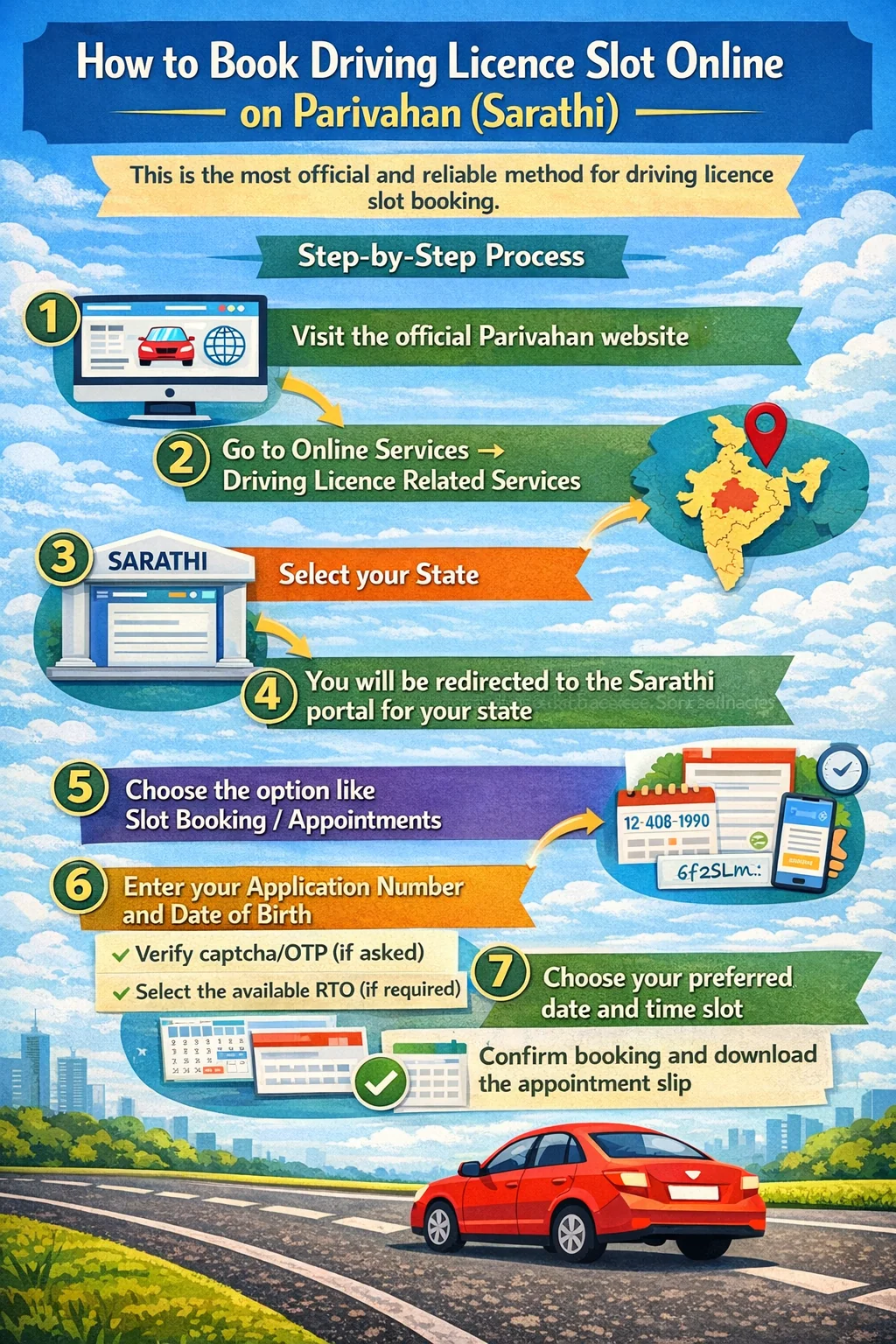
Step-by-Step Process
- Visit the official Parivahan website
- Go to Online Services → Driving Licence Related Services
- Select your State
- You will be redirected to the Sarathi portal for your state
- Choose the option like Slot Booking / Appointments
- Enter your Application Number and Date of Birth
- Verify captcha/OTP (if asked)
- Select the available RTO (if required)
- Choose your preferred date and time slot
- Confirm booking and download the appointment slip
Tip: Always save the appointment slip PDF. It is required at the RTO gate in many cities.
Driving Licence Slot Booking by Application Number
Most applicants search for slot booking using the application number because Sarathi uses the application number as the main tracking key.
Where to Find Your Application Number
You can find it in:
- acknowledgement slip after submission
- payment receipt
- SMS sent to your registered mobile number
- email confirmation (if provided)
Common Mistakes While Entering Application Number
- wrong digits
- missing state selection
- using DL number instead of application number
Learning Licence Slot Booking (LL Test Slot)
If you have applied for a learner licence, you must book an LL test slot to appear for the exam. Book your LL test slot via the official portal: Parivahan (parivahan.gov.in).
Steps for Learning Licence Slot Booking
- Open Parivahan → Driving Licence Related Services
- Select your state
- Go to Appointments / Slot Booking
- Enter application number + DOB
- Select LL Test Slot
- Choose date/time and confirm
- Download appointment slip
What Happens on LL Test Day?
On the test day, you will generally: verify documents, take the computer-based test, get result instantly, receive learner licence approval if passed.
Driving Licence Test Slot Booking (Driving Test Appointment)
After you get a learner licence, you can book a driving test slot for permanent DL. Go to the Sarathi portal via Parivahan for the actual booking: sarathi.parivahan.gov.in.
Steps for DL Test Slot Booking
- Go to Sarathi portal via Parivahan
- Select your state
- Choose DL Services
- Open Slot Booking / Appointments
- Enter application number + DOB
- Choose Driving Test Slot
- Select available date/time
- Confirm booking and download receipt
What Happens on DL Test Day?
Most RTOs will: verify your documents, check vehicle details, conduct driving test, update result on Sarathi.
How to Reschedule Driving Licence Slot Booking Online
If you cannot attend your appointment, Sarathi allows rescheduling in many states. Visit the Sarathi portal to reschedule your slot.
Steps to Reschedule Slot
- Open Sarathi portal (state-wise)
- Go to slot booking section
- Enter application number + DOB
- Choose Reschedule Appointment
- Select new date/time
- Confirm and download updated slip
Note: Some states allow rescheduling only limited times.
How to Cancel Driving Licence Slot Booking
Slot cancellation is available in some states, but not in all. To cancel your slot, visit the Sarathi portal.
Steps to Cancel Slot
- Visit the Sarathi portal
- Open appointment section
- Enter application number + DOB
- Choose Cancel Appointment (if visible)
- Confirm cancellation
Refund policy (if any) depends on the state RTO rules.
How to Check Driving Licence Slot Booking Status
After booking, you should confirm your slot is successfully saved.
You can check your slot booking status using:
- appointment slip PDF
- SMS confirmation
- Sarathi application status page
What Slot Confirmation Usually Shows
- applicant name
- application number
- RTO name
- date and time
- service type (LL/DL)
- receipt number
Driving Licence Slot Booking Fees (LL & DL)
Driving licence slot booking fees depend on: service type (LL/DL/renewal), state RTO fee structure, whether you are booking a retest slot.
Common Fee Types
- learner licence fee
- driving licence fee
- test fee
- smart card fee (in some states)
Note: Exact fees vary by state. Always confirm on Sarathi payment page.
Documents Required for Driving Licence Slot Booking & Test
On the appointment day, carry:
Mandatory Documents
- appointment slip printout
- acknowledgement receipt
- original ID proof
- address proof
- learner licence (for DL test)
Recommended Documents
- passport-size photos (some RTOs ask)
- fee payment receipt
- medical certificate (if applicable)
Vehicle Documents (For DL Test)
If you bring your own vehicle: RC, insurance, PUC, valid permit (if commercial).
Driving Licence Slot Booking Not Working? (Fix Guide)
If you are unable to book a slot, these are the most common issues and solutions.
Driving Licence Slot Booking Rules & Tips
Follow these rules to avoid cancellation or rejection:
- Reach the RTO at least 30–45 minutes early
- Carry all original documents
- Ensure your learner licence is valid (for DL test)
- Bring a valid vehicle with documents for DL test
- Follow lane rules and signals during test
- Avoid agents claiming "guaranteed pass"
Driving Licence Slot Booking State-Wise (Sarathi)
Driving licence slot booking is mostly the same across India, but the Sarathi portal works state-wise. That's why selecting the correct state is mandatory.
Common state examples:
Maharashtra (MH), Uttar Pradesh (UP), Madhya Pradesh (MP), Delhi (DL), Rajasthan (RJ), Karnataka (KA)
Related Driving Licence Services on Parivahan
After booking your slot, you may also need:
- Driving licence status check
- Learning licence status
- DL renewal
- Duplicate DL
- Address change
- DL download via DigiLocker / mParivahan
Other Vehicle Related Services On Parivahan Sewa
Bike RC, RC status, PUC, challan, DL download, DL status, slot booking and more.